Dishwasher displays error code i23, not draining
Issue
- Dishwasher displays error code i23
- My dishwasher is showing an error code and not draining
- Water drainage problem in the dishwasher
Applies to
- Dishwashers
Resolution
Inspect the drain pump cover to ensure it is properly attached.
1. Turn off the dishwasher and disconnect the mains plug from the main socket.
2. Remove the filter system. Refer to the user manual for details.
3. Remove any residual water with a sponge.
4. Pull the plastic cover at an angle with your finger.
Picture 1 - drain pump cover location
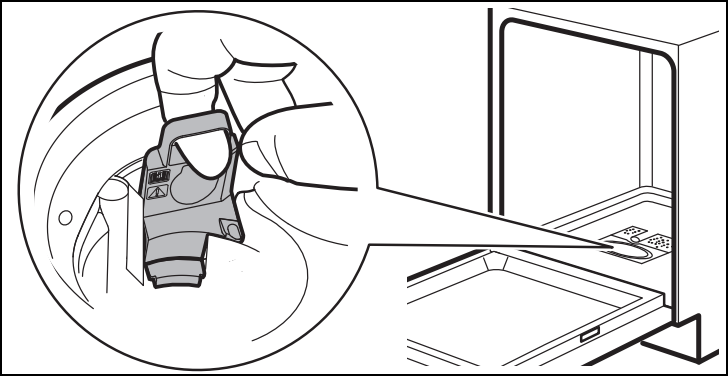
5. Carefully remove any foreign objects from the impeller and surrounding area.
Foreign objects (e.g. pieces of glass, plastic, bones or toothpicks, etc.) decrease the cleaning performance and can cause damage to the drain pump.
6. Insert the plastic cover back in place. Make sure it is not loose.
7. Install the filter system and plug the dishwasher back.
Still need help? Get expert support
If the issue continues, a professional technician can help diagnose and fix the problem.
No matter if your appliance is in warranty, out of warranty, or covered by an appliance protection plan - we’ll guide you to the right service.
Cause
The drain pump cover is loose or missing - i23 error code is displayed.
Was this article helpful?
Related Articles
- Dishwasher displays error code i40, i43 or i44
- Dishwasher displays error code i30
- Dishwasher door does not close
- Symbols and programmes on your Electrolux dishwasher
- The auto-cleaning indicator ("Machine Care") lights up on the dishwasher
- How to change the drain filter in my Electrolux dishwasher? (video)
- Electrolux Dishwasher Displays an Error Code – Causes and Solutions
- Dishwasher displays error code I20, C2, F2 or AL6, or beeps twice, not draining
- Is it possible to connect the dishwasher to hot water supply?
- Dishwasher displays error code iF0, iFo or iF1 - causes and solutions
Spare parts & Accessories
Find original spare parts for your appliance in our webshop and have them delivered directly to your door.
Related Articles
- Dishwasher displays error code i40, i43 or i44
- Dishwasher displays error code i30
- Dishwasher door does not close
- Symbols and programmes on your Electrolux dishwasher
- The auto-cleaning indicator ("Machine Care") lights up on the dishwasher
- How to change the drain filter in my Electrolux dishwasher? (video)
- Electrolux Dishwasher Displays an Error Code – Causes and Solutions
- Dishwasher displays error code I20, C2, F2 or AL6, or beeps twice, not draining
- Is it possible to connect the dishwasher to hot water supply?
- Dishwasher displays error code iF0, iFo or iF1 - causes and solutions