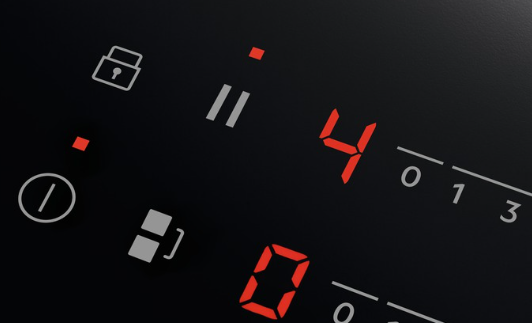
Hob displays message U or | |
Issue
- Hob/cooker displays message U or | | (pause). It indicates that the STOP+GO (keep warm) function is activated.
- Pause function on induction hobs - how it works?
Applies to
- ceramic hob
- induction hob
Resolution
1. To deactivate, touch on the STOP+GO or | | (pause) button.
For more information, refer to the article: How to use hob "Stop and Go" or the "Pause" feature.
Download the user manual to learn more about your appliance functions.
Was this article helpful?
Related Articles
- Hob, Oven or Cooker Does Not Turn On
- Hob displays error message E3 / E311 / E312 / E313
- One of the rings on my Gas Cooker/Hob won’t stay alight?
- What Cookware Works on Induction (Complete Guide)
- Induction hob displays error code F or F1
- Dropped something on hob / impact damage / cracked glass / care / replace and how to organise a repair
- How to clean your Electrolux induction hob
- Touch Control Induction or Ceramic hob beeps and then switches off
- Causes of cracks across induction or ceramic hobs
- Hob blows/ trips fuse
Related Articles
- Hob, Oven or Cooker Does Not Turn On
- Hob displays error message E3 / E311 / E312 / E313
- One of the rings on my Gas Cooker/Hob won’t stay alight?
- What Cookware Works on Induction (Complete Guide)
- Induction hob displays error code F or F1
- Dropped something on hob / impact damage / cracked glass / care / replace and how to organise a repair
- How to clean your Electrolux induction hob
- Touch Control Induction or Ceramic hob beeps and then switches off
- Causes of cracks across induction or ceramic hobs
- Hob blows/ trips fuse