Where and how do I change the basic settings on my AEG dishwasher
Issue
Where and how do I change the basic settings on my AEG dishwasher
Resolution
How to access and change basic settings (AEG dishwasher)
On AEG dishwashers, the “basic settings” (often called user settings or setting mode) are changed directly from the control panel. The exact button combination varies slightly by model, but the process is very similar across most AEG machines*.
*Note: The images shown below are for reference only and may represent a different or earlier user‑interface version. Button layout, programme names, symbols, or indicators may vary depending on the appliance model. Always refer to your user manual for information specific to your appliance.
1. Turn the dishwasher on
- Press the On/Off button.
- Do not start a programme.
2. Enter settings mode
Built-in dishwashers

You can enter setting mode before starting a programme. You cannot enter setting mode while the programme is running.
Press and hold simultaneously ECO and AUTO for about 3 seconds. The display shows the first setting: HAr (Water Hardness).
3. Navigate through settings
Three LEDs will light up on the MY TIME bar
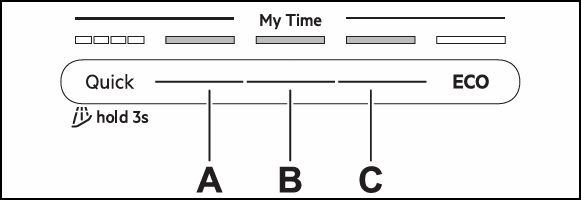
A - Previous button
B - OK button
C - Next button
Use Previous and Next to switch between the settings and to change their value. Use OK to enter the setting and to confirm changing its value.
To exit setting mode, press and hold simultaneously ECO and AUTO for about 3 seconds.
The appliance returns to the programme selection. The saved settings remain valid until you change them again.
4. Settings overview
Names in brackets correspond to how the dishwasher displays the settings in setting mode. You can also change the settings using the app.
Water hardness (HAr)
Set the water softener level (1–10) based on the water hardness. Default: level 5.
Rinse aid level (rA)
Adjust the rinse aid level (0–8). Default: level 8.
End sound (ES)
Select On to activate or Off to deactivate the acoustic signal for the end of a programme. Default: Off.
Auto door open (Ado)
Select On to activate or Off to deactivate Air Dry function. Default: On.
Key tones (to)
Select On to activate or Off to deactivate the button sound when pressed. Default: On.
Forget network (Fn)
Select Yes to reset the wireless network credentials. Select No to exit.
Hour usage (Hu)
Check the total hours of dishwasher usage. The counter stops at 65535.
PNC number (Pnc)
Check the PNC number of your appliance. Provide the number when you contact an Authorised Service Centre.
Reset settings (rS)
Select Yes to reset the appliance to factory settings. The setting does not reset the hour usage. The setting does not reset the wire less connection setup. Select No to exit.
Was this article helpful?
Related Articles
- How to change the lower spray arm in my Electrolux dishwasher? (video)
- Dishwasher displays error code i24, not draining
- Dishwasher displays error code i23, not draining
- Electrolux Dishwasher Displays an Error Code – Causes and Solutions
- How to disable the AirDry function in a dishwasher with a QuickSelect panel (level 2)
- Dishwasher Making Noises – Normal Sounds and Signs of a Problem
- How to disable the AirDry function in a dishwasher with a QuickSelect panel (level 1)
- Dishwasher door will not close properly or is crooked
- Symbols and programmes on your Electrolux dishwasher
- Rust spots on cutlery after washing in the dishwasher
Spare parts & Accessories
Find original spare parts for your appliance in our webshop and have them delivered directly to your door.
Related Articles
- How to change the lower spray arm in my Electrolux dishwasher? (video)
- Dishwasher displays error code i24, not draining
- Dishwasher displays error code i23, not draining
- Electrolux Dishwasher Displays an Error Code – Causes and Solutions
- How to disable the AirDry function in a dishwasher with a QuickSelect panel (level 2)
- Dishwasher Making Noises – Normal Sounds and Signs of a Problem
- How to disable the AirDry function in a dishwasher with a QuickSelect panel (level 1)
- Dishwasher door will not close properly or is crooked
- Symbols and programmes on your Electrolux dishwasher
- Rust spots on cutlery after washing in the dishwasher