How to use the ZeroDegree LongFresh compartment on your Electrolux fridge
Resolution
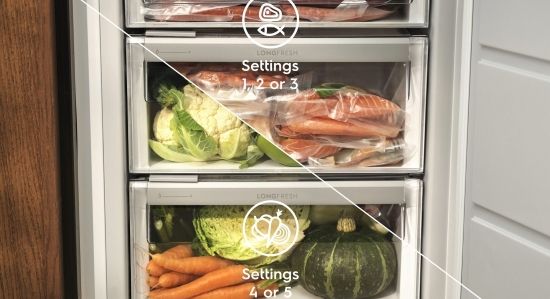
The temperature and humidity in the Electrolux ZeroDegree LongFresh compartment provide optimal conditions for storing fresh and delicate food like fish, meat and seafood. This helps preserve nutrition.
Selected Electrolux fridges come with the ZeroDegree LongFresh compartment.
Possible settings for the ZeroDegree LongFresh compartment
There are five settings available, ranging from 1 to 5. The first level is the coldest, allowing you to cool the compartment down to 0°C, which is colder than the rest of the fridge. The fifth level is the warmest, with a temperature similar to the rest of the fridge.
The default setting is level 5, which ensures the overall effective performance of the ZeroDegree LongFresh compartment.
- Levels 1 to 3: Recommended for fish and meat.
- Levels 4 and 5: Recommended for vegetables and fruits. Use of humidity control, available in drawers, is recommended when preserving fruit and vegetables.
How to change the settings
The 0° Mode allows you to set different temperature levels in the LongFresh compartment. The default setting is 5. The coldest setting is 1 and the warmest setting is 5.
To change the setting:
- Tap 0° Mode button until you select the desired temperature level.
- The 0° Mode indicator makes a sound and blinks for 3 seconds.
- When the 0° Mode indicator stops blinking, the currently displayed temperature level activates.
For more information about your specific refrigerator model, check the user manual.
Was this article helpful?
Related Articles
- Fridge shows an alarm, red warning light, flashing triangle or beeps
- Temperature in the fridge is too low
- My fridge door is difficult to open
- What temperatures do the thermostat settings correspond to?
- Transport instructions for refrigeration appliances
- The lights flash on the fridge control panel, the fridge does not cool
- Fridge with internal controls / light not working / no longer cooling / overcooling / getting hot
- How to clean your Electrolux fridge and freezer
- Temperature is too high in the fridge / fridge not cooling
- Refrigerator shows a line (“— “) on the display
Related Articles
- Fridge shows an alarm, red warning light, flashing triangle or beeps
- Temperature in the fridge is too low
- My fridge door is difficult to open
- What temperatures do the thermostat settings correspond to?
- Transport instructions for refrigeration appliances
- The lights flash on the fridge control panel, the fridge does not cool
- Fridge with internal controls / light not working / no longer cooling / overcooling / getting hot
- How to clean your Electrolux fridge and freezer
- Temperature is too high in the fridge / fridge not cooling
- Refrigerator shows a line (“— “) on the display