How to Order a New Cutlery Basket for Your Electrolux Dishwasher
Issue
- How do I order a new cutlery basket for my dishwasher?
- Electrolux Dishwasher cutlery basket replacement
Resolution
If your Electrolux dishwasher cutlery basket is broken, worn out or missing, you can easily order a replacement part online.
This guide explains how to find the correct cutlery basket for your dishwasher and order it in the UK.
When do you need a new cutlery basket?
You may need a replacement if:
- the basket is cracked or damaged
- compartments are broken
- cutlery no longer stays in place during cycles
Replacing the basket helps improve cleaning results and keeps utensils organised.
To order a new cutlery basket for your dishwasher and have it delivered directly to your door, visit our webshop.
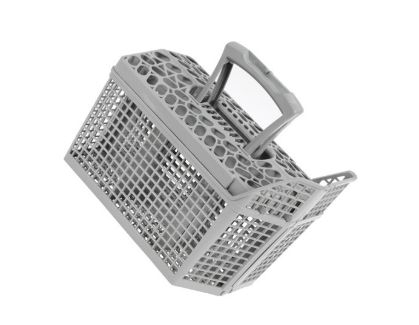
Step-by-Step: How to Order a Dishwasher Cutlery Basket
Step 1: Find your product number (PNC)
To get the correct replacement part, you need your Product Number Code (PNC).
- This is an 9-digit code found on the rating plate (911xxxxxx)
- Usually located:
- on the inside of the dishwasher door
- around the door frame
The PNC ensures you receive parts that fit your exact model.
Picture 1. rating plate example
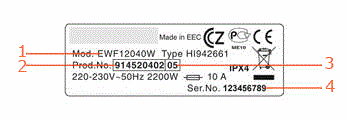
1. Model number
2. Product number (PNC)
3. ELC number
4. Serial number
Step 2: Go to the Electrolux Webshop
Visit our official spare parts shop:
- Enter your PNC code in the search bar
- Browse compatible parts
- select the correct cutlery basket replacement
Using the PNC prevents ordering the wrong part.
Step 3: Order the replacement basket
- Add the correct basket to your basket (cart)
- choose delivery options (UK next‑day often available)
- complete checkout
Genuine parts ensure the best fit and performance.
Was this article helpful?
Related Articles
- Dishwasher is not heating up water
- Dishwasher does not switch on, no light on the control panel
- Electrolux Dishwasher Displays an Error Code – Causes and Solutions
- Dishwasher displays error code i24, not draining
- Dishwasher displays error code i20, beeps twice, not draining
- How to add rinse aid to your Electrolux dishwasher
- Dishwasher displays error code i40, i43 or i44
- How to change the lower spray arm in my Electrolux dishwasher? (video)
- Dishwasher displays error code i50
- The auto-cleaning indicator ("Machine Care") lights up on the dishwasher
Spare parts & Accessories
Find original spare parts for your appliance in our webshop and have them delivered directly to your door.
Related Articles
- Dishwasher is not heating up water
- Dishwasher does not switch on, no light on the control panel
- Electrolux Dishwasher Displays an Error Code – Causes and Solutions
- Dishwasher displays error code i24, not draining
- Dishwasher displays error code i20, beeps twice, not draining
- How to add rinse aid to your Electrolux dishwasher
- Dishwasher displays error code i40, i43 or i44
- How to change the lower spray arm in my Electrolux dishwasher? (video)
- Dishwasher displays error code i50
- The auto-cleaning indicator ("Machine Care") lights up on the dishwasher