How to send a recipe to the oven?
Resolution
Question:
- How to send a recipe to the oven?
- How to use Recipe Wizard feature?
Applies to:
- CombiSteam Pro Smart connected oven
Answer:
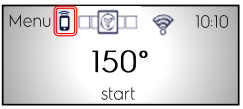
1. Make sure you enable Remote Control through the oven screen (press the highlighted icon on the oven screen and select YES).
2. Access Recipe Wizard in the My Electrolux Kitchen App .
3. Choose the recipe you wish to cook, and at the bottom of the preparation instructions select “Send to the oven”.
The oven will display the recipe you’ve sent and the cooking will start automatically.
Info:
- Your dish should be in the oven before you start the cooking program. If you open the door during the remote cooking, follow the oven screen to Resume cooking process.
Was this article helpful?
Related Articles
- Before using your Electrolux oven for the first time
- How to remove a built-in oven door (video)
- Connected appliances - What configuration has to be set on the router software?
- Oven cooling fan runs all the time
- Oven displays error code with prefix F
- The time is not shown on the display when the oven is turned off
- Symbols and functions on your Electrolux oven
- Oven Glass Shattered
- How to remove oven shelf supports for cleaning
- The door of the oven does not close properly