Connected appliances - What configuration has to be set on the router software?
Issue
- What configuration has to be set on the router software?
- Can I use connected appliances with a 5GHz WiFi network?
Applies to
- washing machine
- tumble dryer
- oven
- dishwasher
- air purifiers
- robotic vacuums
Resolution
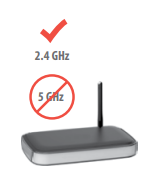
Most home routers will have a 2.4 and a 5GHz option available. Our appliances will not work on a 5GHz connection.
Required router settings are as follows:
- Frequency 2.412 – 2.472 GHz for the European market
- You cannot connect your appliances to a 5GHz WiFi network
- Protocol IEEE 802.11b/g/n 2x2 radio streams
- Max power < 20 dBm
Was this article helpful?
Related Articles
- Only one oven is working, One oven is not heating (Integrated Double Ovens & Freestanding Cookers)
- Oven does not heat up
- How to use the Sous Vide function on your Electrolux steam oven
- Steam cooking – how to fully utilise your Electrolux steam oven
- How to bake with your Electrolux steam oven
- How to remove oven shelf supports for cleaning
- Oven cooling fan runs all the time
- How to use Pyrolytic Cleaning on your Electrolux oven
- The time is not shown on the display when the oven is turned off
- How to remove a built-in oven door (video)
Related Articles
- Only one oven is working, One oven is not heating (Integrated Double Ovens & Freestanding Cookers)
- Oven does not heat up
- How to use the Sous Vide function on your Electrolux steam oven
- Steam cooking – how to fully utilise your Electrolux steam oven
- How to bake with your Electrolux steam oven
- How to remove oven shelf supports for cleaning
- Oven cooling fan runs all the time
- How to use Pyrolytic Cleaning on your Electrolux oven
- The time is not shown on the display when the oven is turned off
- How to remove a built-in oven door (video)